> For the complete documentation index, see [llms.txt](https://docs.doku.com/llms.txt). Markdown versions of documentation pages are available by appending `.md` to page URLs; this page is available as [Markdown](https://docs.doku.com/changelog/id/september-2026/sub-account-v2-unified-ledger.md).
# Sub Account V2 - Unified Ledger
Tanggal Efektif: 1 September 2026
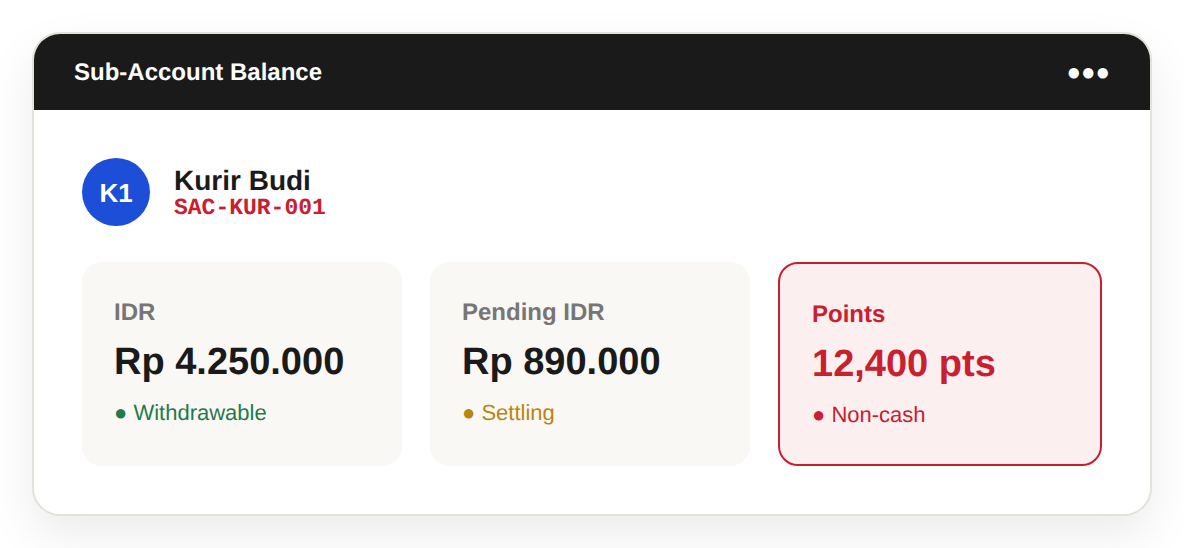
DOKU **Unified Ledger** memungkinkan merchant mencatat dan melacak **nilai non-tunai** bersama saldo sub-account yang sudah ada.
Setiap sub-account kini dapat memiliki **Points** sebagai saldo ketiga di samping **IDR dan Pending IDR**, sehingga bisnis memiliki cara yang lebih terhubung untuk mengelola berbagai jenis nilai dalam operasional mereka. [Baca selengkapnya di Dokumentasi DOKU...](https://docs.doku.com/wallet-as-a-service/sub-account/account-management#points-ledger-unified-ledger)
***
### Apa yang Baru dengan Unified Ledger?
Dengan Unified Ledger, **Points** kini dapat dicatat dan dikelola sebagai bagian dari saldo sub-account.
Setiap sub-account dapat memiliki:
* **IDR**
* **Pending IDR**
* **Points**
Points dapat digunakan untuk merepresentasikan nilai non-tunai yang perlu dilacak di dalam bisnis.
Sebagai contoh, bisnis dapat menggunakan Points untuk merepresentasikan **poin loyalitas, kredit toko, atau saldo agen**.
***
### 💡 Mengapa Produk ini Penting
Unified Ledger menyatukan catatan tersebut dalam struktur sub-account yang sama, sehingga lebih mudah melacak berbagai jenis nilai di satu tempat.
#### Untuk Merchant
* Mencatat nilai non-tunai bersama saldo sub-account
* Mengelola Points di dalam masing-masing sub-account
* Mendukung kebutuhan loyalitas, kredit, atau saldo agen
* Menjaga berbagai jenis nilai tetap tertata dalam satu sistem
* Membangun pandangan saldo yang lebih terhubung di seluruh sub-account
#### Untuk Pelanggan
* Mengurangi kebutuhan untuk menyimpan catatan nilai secara terpisah
* Mempermudah pelacakan saldo di berbagai entitas bisnis
* Menghubungkan catatan non-tunai dengan struktur sub-account yang sudah ada
***
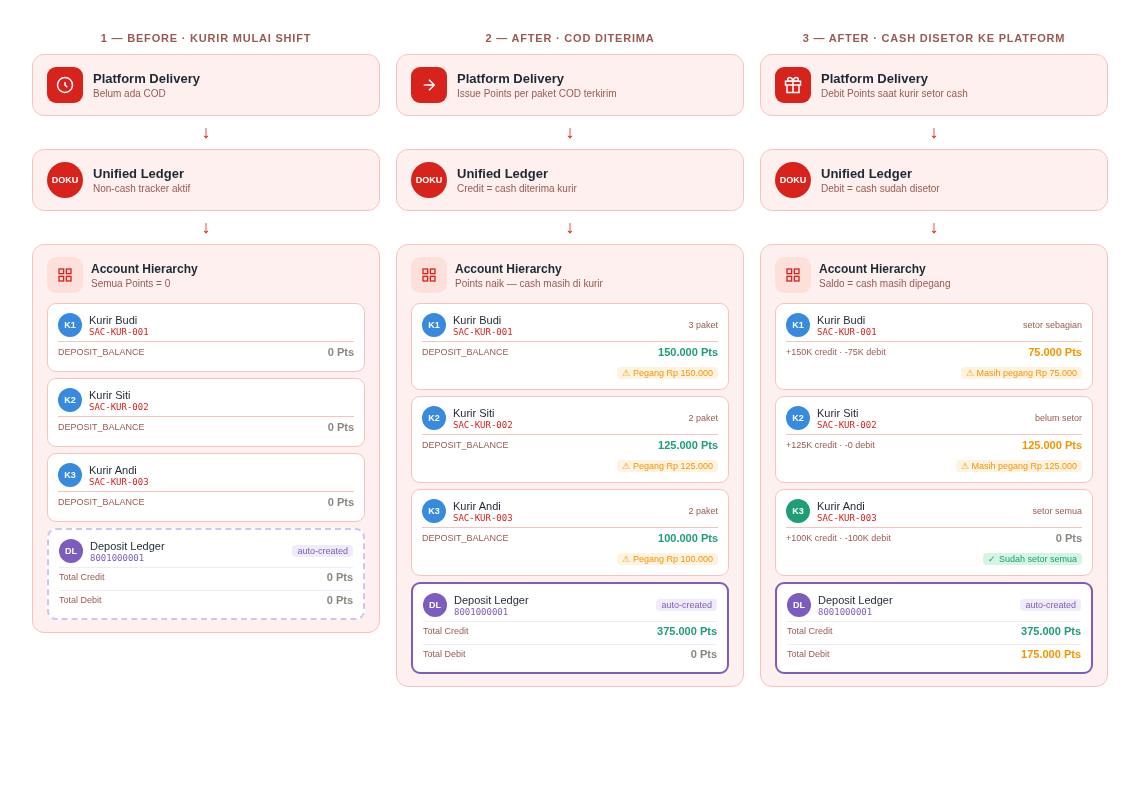
### Cara Kerja Unified Ledger
#### 🔄 Sebelum
Bisnis yang perlu melacak poin loyalitas, kredit toko, atau saldo agen mungkin harus menyimpan catatan tersebut secara terpisah dari saldo sub-account DOKU mereka.
Hal ini dapat mempersulit upaya menjaga gambaran yang terhubung dari berbagai jenis nilai.
#### 🆕 Sesudah
Dengan **Unified Ledger**, Points dapat dicatat langsung di dalam sub-account bersama IDR dan Pending IDR.
Sebagai contoh:
**Sub-Account A**
* IDR: 1.000.000
* Pending IDR: 250.000
* Points: 5.000
Dengan begitu, merchant dapat melacak berbagai jenis nilai dalam struktur sub-account yang sama.
***
### Try Sandbox Demo
Anda dapat menjelajahi Unified Ledger melalui demo DOKU Sandbox tanpa pengaturan akun tambahan.
**Coba Demo Unified Ledger** →
Untuk informasi lebih lanjut tentang Sub-Account dan Unified Ledger, lihat [**DOKU API References**](https://developers.doku.com/wallet-as-a-service/sub-account/sub-account-v2#point-flow-unified-ledger) dan [**Dokumentasi DOKU**.](https://docs.doku.com/wallet-as-a-service/sub-account/account-management#points-ledger-unified-ledger)
***
### Customize Your Checkout
The Mobile Checkout SDK supports customization of the **secondary color**.
The selected color is reflected in elements such as:
* Button colors
* Highlighted text
This allows merchants to align selected parts of the checkout experience with their brand.
***
### **Potensial Penggunaan Unified Ledger**
Unified Ledger dapat mendukung bisnis yang perlu mengelola berbagai jenis nilai non-tunai, seperti:
* **Loyalty & Rewards:** mencatat poin loyalitas pelanggan atau member.
* **Store Credit:** melacak saldo kredit yang dapat digunakan pelanggan untuk pembelian berikutnya.
* **Agent / Reseller Balances:** mencatat saldo prabayar atau operasional yang dialokasikan ke agen.
* **Multi-Entity Operations:** menjaga catatan nilai yang berbeda di berbagai sub-account.
* **Digital Platforms:** melacak nilai non-tunai bersama saldo operasional.
***
### ⚠️ Catatan Penting
* **Points** adalah saldo non-tunai dan tidak mewakili dana yang di-settle melalui DOKU.
* Unified Ledger dirancang untuk **mencatat dan melacak nilai**, bukan memindahkan dana.
* Untuk pemindahan dana dan routing pembayaran, gunakan **Collect & Route**.
* IDR dan Pending IDR tetap tersedia bersama Points di dalam sub-account.
***
Untuk bantuan lebih lanjut, silakan hubungi Care Team kami melalui atau (021) 1500963.
***
Terima kasih,\
**DOKU Product Team**
---
# Agent Instructions
This documentation is published with GitBook. GitBook is the documentation platform designed so that both humans and AI agents can read, navigate, and reason over technical content effectively. Learn more at gitbook.com.
## Querying This Documentation
If you need additional information that is not directly available in this page, you can query the documentation by asking a question.
Perform an HTTP GET request on the following URL with the `ask` and `goal` query parameters:
```
GET https://docs.doku.com/changelog/id/september-2026/sub-account-v2-unified-ledger.md?ask=&goal=
```
`ask` is the immediate question: it should be specific, self-contained, and written in natural language.
`goal` is what the user is ultimately trying to achieve, the reason they need the answer. Sharing it helps GitBook give you a better, more relevant answer. A goal is most helpful when it describes the outcome the user wants rather than restating the question. For example, with `ask=how do I create an API token`, a goal like `automate deployments from our CI pipeline` lets GitBook tailor the answer to that use case.
The response will contain a direct answer to the question and relevant excerpts and sources from the documentation.
Use this mechanism when the answer is not explicitly present in the current page, you need clarification or additional context, or you want to retrieve related documentation sections.