> For the complete documentation index, see [llms.txt](https://docs.doku.com/llms.txt). Markdown versions of documentation pages are available by appending `.md` to page URLs; this page is available as [Markdown](https://docs.doku.com/accept-payments/no-integration-products/digital-catalog.md).

# Digital Catalog

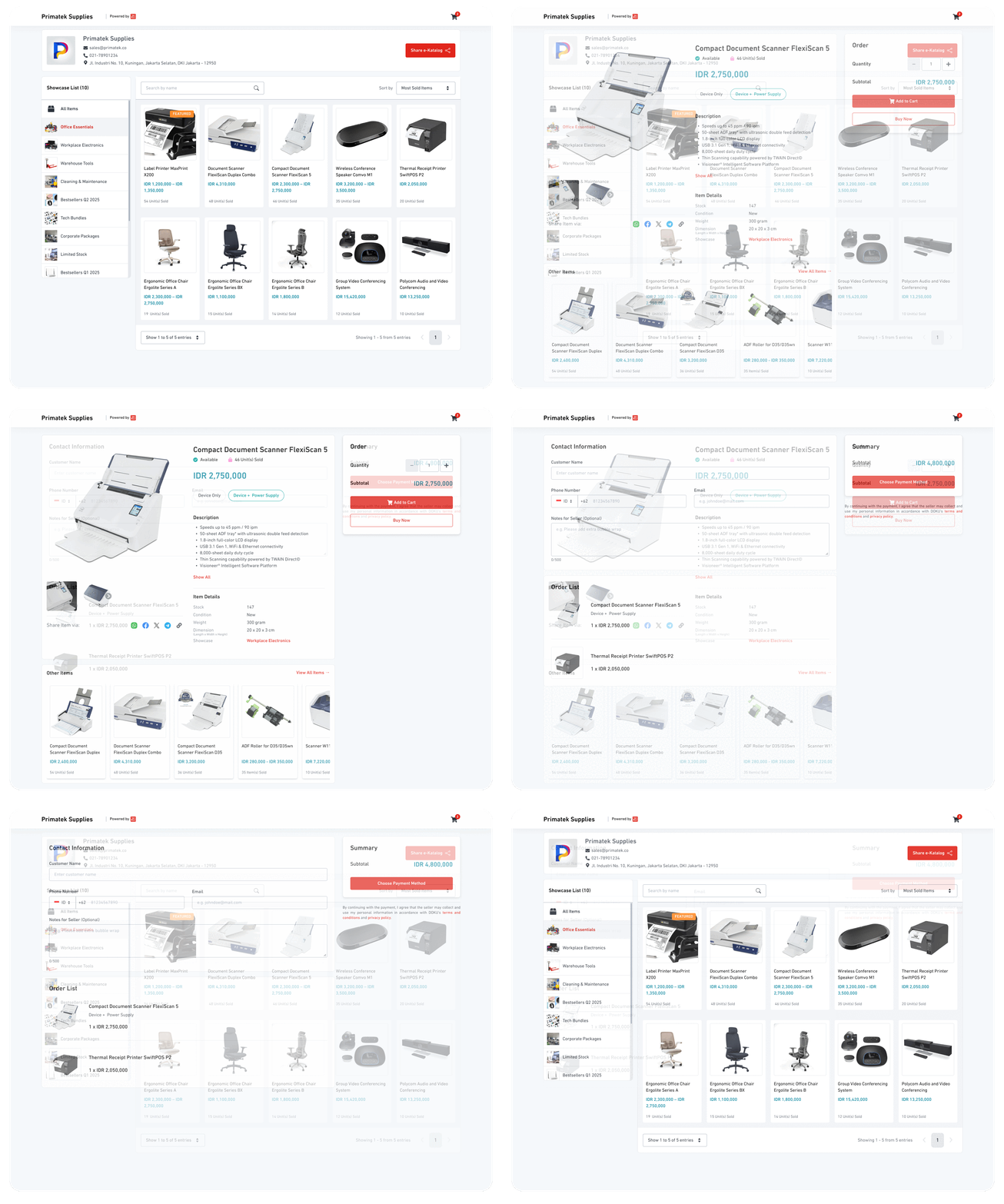
<figure><img src="/files/uXb9Px0Iqm5WKLorxgA4" alt=""><figcaption></figcaption></figure>

## Overview

**Digital Catalog** enables merchants to create a digital storefront without requiring integration, technical development, or the need to maintain separate website infrastructure. With Digital Catalog, merchants can easily showcase their products, manage inventory, and accept payments through DOKU’s secure payment gateway.&#x20;

It is an ideal solution for entrepreneurs and small businesses seeking to quickly establish a professional online presence and start selling.

<table data-view="cards"><thead><tr><th></th><th data-hidden data-card-target data-type="content-ref"></th></tr></thead><tbody><tr><td><strong>Manage Catalog</strong><br><br></td><td><a href="/pages/9QoWMubKZL20ChSfIfjj">/pages/9QoWMubKZL20ChSfIfjj</a></td></tr><tr><td><strong>Manage Items</strong><br><br></td><td><a href="/pages/Fh7j10ZgXsdeFmo992XH">/pages/Fh7j10ZgXsdeFmo992XH</a></td></tr><tr><td><strong>Place an Order</strong><br><br></td><td><a href="/pages/6Db3TM5zrwmbauO8ywOZ">/pages/6Db3TM5zrwmbauO8ywOZ</a></td></tr><tr><td><strong>Manage Orders</strong><br><br></td><td><a href="/pages/7KIxwRsAjEMZLLoVc7yg">/pages/7KIxwRsAjEMZLLoVc7yg</a></td></tr></tbody></table>

***

## Key Features

<table><thead><tr><th></th><th width="375.5999755859375"></th></tr></thead><tbody><tr><td><strong>Feature</strong></td><td><strong>Description</strong></td></tr><tr><td>Showcase</td><td>Organize items into curated collections for events, themes, or categories.</td></tr><tr><td>Featured Items</td><td>Pin up to 5 priority items to the top of your catalog regardless of sorting.</td></tr><tr><td>Multi-Variant Support</td><td>Allows up to 2 item variants (e.g., color, size) per product.</td></tr><tr><td>Scheduled Publication</td><td>Choose to publish items immediately, at a later time, or within a custom date range.</td></tr><tr><td>QR Code</td><td>Generate QR codes or share catalog/items via WhatsApp, Facebook, Telegram, X, and links.</td></tr><tr><td>Shipment</td><td>Partnered with 3PL logistics. DOKU handles delivery requests automatically—no need for manual coordination. 3PL include JNE, J&#x26;T, SiCepat, Go-Send, Grab Express, Indah Cargo, dan Deliveree.</td></tr><tr><td>Order Tracking and Notification</td><td>Customers can easily track the status of their orders in real-time, and will receive email notifications for every update, including order processing, shipment, and delivery.</td></tr><tr><td>Custom Order Type<br><br><span data-gb-custom-inline data-tag="emoji" data-code="2139">ℹ️</span><sub>Only available for Malaysian Business Accounts</sub></td><td>Allow customers to choose their preferred fulfillment method during checkout, either <strong>Delivery Address</strong> or <strong>Self Pickup</strong>.</td></tr><tr><td>Custom Delivery Fee<br><br><span data-gb-custom-inline data-tag="emoji" data-code="2139">ℹ️</span><sub>Only available for Malaysian Business Accounts</sub></td><td>Allow Configure Delivery fee based on order quantity and delivery destination</td></tr><tr><td>Custom Product Additional Fields<br><br><span data-gb-custom-inline data-tag="emoji" data-code="2139">ℹ️</span><sub>Only available for Malaysian Business Accounts</sub></td><td>Collect additional product-specific information from customers by adding customizable input fields to individual products.</td></tr><tr><td>SST<br><br><span data-gb-custom-inline data-tag="emoji" data-code="2139">ℹ️</span><sub>Only available for Malaysia Business Accounts</sub></td><td>Manage Sales and Service Tax (SST) for orders in compliance with Malaysian tax requirements.</td></tr></tbody></table>

***

## Use Cases

{% tabs %}
{% tab title="Catalog" %}
**🍛 Food & Beverages**

* Digital menu that displays all food and beverages.
* Use variants for portion sizes, spice levels, or topping options.

**🏨 Travel & Hospitality**

* Use as a room service menu or upsell page.
* Showcase services like spa bookings, tours, or in-room items with schedule-based availability.
  {% endtab %}

{% tab title="Store" %}
**🛍️ Retail**

* List physical goods with images and variants.
* Great for clothing, accessories, or gadgets.

**📚 Education**

* Sell books, uniforms, or digital learning materials.
* Create showcases by class, grade, or semester.

**🎮 Digital & Gaming**

* Distribute digital products like game codes, event tickets, or downloads.
* Use custom links for digital delivery, and variants for different editions or regions.
  {% endtab %}

{% tab title="Event Bookings" %}
**🎫 Event Bookings**

* Distribute digital products like game codes, event tickets, or downloads.
* Use custom links for digital delivery, and variants for different editions or regions.
  {% endtab %}

{% tab title="Freelancers" %}
**🧑‍💻 Freelancers**

* Use Digital Catalog as a service menu.
* List pricing packages (e.g., logo design, consultation) with variant support for revisions or delivery time.
  {% endtab %}
  {% endtabs %}

***

## FAQ

<details>

<summary>Can I sell services instead of products on Digital Catalog?</summary>

Yes. Use item descriptions and optional fields creatively. Great for freelancers or professional services.

</details>

<details>

<summary>Is there a way to schedule flash sales or time-limited products on Digital Catalog?</summary>

Yes. Use the Custom Publication Period to publish items for specific dates only.

</details>

<details>

<summary>Can I use Digital Catalog for digital downloads?</summary>

Yes. Upload a digital item link per variant. Ideal for game keys, event tickets, etc.

</details>

<details>

<summary>Can I integrate Digital Catalog with my existing website?</summary>

Not directly, but you can share catalog links or embed QR codes anywhere on your site.

</details>


---

# Agent Instructions
This documentation is published with GitBook. GitBook is the documentation platform designed so that both humans and AI agents can read, navigate, and reason over technical content effectively. Learn more at gitbook.com.

## Querying This Documentation
If you need additional information that is not directly available in this page, you can query the documentation dynamically by asking a question.

Perform an HTTP GET request on the current page URL with the `ask` query parameter, and the optional `goal` query parameter:

```
GET https://docs.doku.com/accept-payments/no-integration-products/digital-catalog.md?ask=<question>&goal=<endgoal>
```

`ask` is the immediate question: it should be specific, self-contained, and written in natural language.
`goal` is optional and describes the broader end goal you are ultimately trying to accomplish on behalf of the user. GitBook uses it to tailor the answer towards what is most useful for that goal.

The response will contain a direct answer to the question and relevant excerpts and sources from the documentation.

Use this mechanism when the answer is not explicitly present in the current page, you need clarification or additional context, or you want to retrieve related documentation sections.
